HTML Structure
-
A beginner-friendly explanation of the complete HTML structure, covering DOCTYPE, head, body, elements, and how a webpage is organized.tgbvvbgvt t tbvtbv tbtbtgb bt
🌐 What is HTML?
✅ HTML = HyperText Markup Language
HTML is the standard language used to create webpages.
It tells the web browser two very important things:🔹 What content exists
➡️ Text, images, videos, links, buttons, forms🔹 How that content is organized
➡️ Headings, paragraphs, sections, lists📌 Important Note:
🚫 HTML does NOT handle:Design (that’s CSS 🎨)
Logic or interaction (that’s JavaScript ⚙️)
✅ HTML’s job = Structure + Content only
🔍 Breaking Down the Name: HTML
🧩 Let’s understand it word by word:
🔗 HyperText
➡️ Text that contains links
➡️ Allows users to jump from one page to another🏷️ Markup
➡️ Uses special tags to mark content
➡️ Example: <h1>, <p>, <img>📖 Language
➡️ Follows fixed rules & syntax
✨ Conclusion:
➡️ Must be written correctly for browsers to understand
👉 HTML is a language that marks content using tags
🧱 What Does HTML Actually Do?
HTML helps the browser understand:
📌 This is a heading
📌 This is a paragraph
📌 This is an image
📌 This is a link
📌 This is a form🚫 Without HTML:
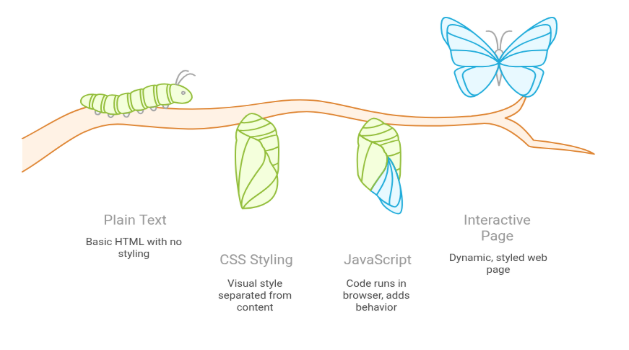
Everything would look like plain text
No structure
No clarity
No proper webpage
✅ HTML gives meaning to content
🧠 Why HTML Is So Important
✅ Foundation of Every Website
Every website you visit starts with HTML
🌍 Examples:
YouTube
Instagram
Amazon
➡️ Even the biggest apps are built on top of HTML
✅ Browsers Understand HTML
Web browsers are designed to read HTML files and display them visually.
🌐 Popular browsers:
Chrome
Firefox
Safari
Edge
✅ No HTML = Browser has nothing to display
✅ Creates Page Structure
HTML defines:
📌 Headings
📌 Paragraphs
📌 Lists
📌 Images
📌 Forms
📌 Tables🧠 Why structure matters ?
Better user experience
Better readability
Better SEO (search engine ranking)
✅ Required Before CSS & JavaScript
📚 Correct Learning Order:
🧱 HTML → Structure
🎨 CSS → Design
⚙️ JavaScript → Behavior❌ Without HTML:
CSS has nothing to style
JavaScript has nothing to control
✅ HTML always comes first
🦴 HTML Structure (
(The Skeleton of Every Webpage)
Every HTML page follows a fixed and logical structure, just like a human skeleton.
This structure helps:
✅ Browsers understand the page correctly
✨ Think of HTML structure as the blueprint of a building
✅ Developers write clean & readable code
✅ Search engines index pages properly

HTML Tags
🔖 HTML Works Using Tags
HTML does everything using tags.
🧠 A tag tells the browser:
✅ What type of content it is
✅ How it should be displayed
👉 Without tags, a browser cannot understand anything.
🏗️ Tag Structure (Basic Format)
Every normal HTML tag has this structure
<tagname> Content </tagname>
📌 Example:dfgdg
<p>This is a paragraph</p>
✅ Opening tag → <p>
✅ Content → This is a paragraph
✅ Closing tag → </p>🧩 Types of HTML Tags
HTML tags are mainly of two types:
1️⃣ Container Tags
(Have Opening + Closing Tag)
✅ These tags wrap content inside them
📝 Examples:
<h1>Title</h1>
<p>This is a paragraph</p>
<div>This is a container</div>
📌 Structure:
Opening tag ✅
Content ✅
Closing tag ✅
2️⃣ Self-Closing Tags
(No Closing Tag)
✅ These tags do not contain content
✅ They close themselves automatically📝 Examples:
<img />
<br />
<hr />
📌 Used for:
Images
Line breaks
Horizontal lines
⚠️ HTML is NOT Case-Sensitive (But Be Careful)
✅ Both of these work:
<P>Hello</P>
<p>Hello</p>
📌 But best practice ✅
👉 Always use lowercase tags✅ Clean
✅ Professional
✅ Industry standard🧱 HTML Tags
(Building Blocks of a Webpage)
HTML works completely using tags.
🧠 Each tag tells the browser:
What type of content it is
How it should behave
How it should appear structurally
➡️ Combine them to build a full webpage
📘 HTML Headings (<h1> to <h6>)
🌟 What Are HTML Headings?
HTML headings are used to define:
✅ Main titles
✅ Section headings
✅ Sub-headingsThey help:
🧠 Users understand content
🔍 Search engines read page importance
📑 Create proper structure
📊 Heading Levels
<h1>Main Heading</h1>
<h2>Sub Heading</h2>
<h3>Smaller Heading</h3>
<h4>Section Title</h4>
<h5>Minor Heading</h5>
<h6>Least Important Heading</h6>
📌 Rules to remember:
<h1> → Most important (page title)
<h6> → Least important
🖼️ What is the <img> Tag?
The <img> tag is used to display images on a webpage.
📸 Images can be:
Photos
Logos
Icons
Banners
Graphics
📌 The <img> tag is a self-closing tag
➡️ It does NOT have a closing tag.🧱 Basic Syntax of <img> Tag
<img src="image.jpg" alt="Image description">
🔍 Important Attributes of <img>
✅ 1️⃣ src (Source)
➡️ Tells the browser where the image is located
<img src="photo.png">
📌 Without src, image will NOT display ❌
✅ 2️⃣ alt (Alternate Text)
➡️ Text shown when:
Image fails to load
Screen readers are used (important for accessibility ♿)
Improves SEO 🔍
<img src="car.jpg" alt="Red sports car">
✅ Always use alt attribute
✅ 3️⃣ width and height
➡️ Used to control image size
<img src="logo.png" width="200" height="100">
📌 Units are in pixels by default
⚠️ Common Mistakes to Avoid
❌ Forgetting alt attribute
❌ Wrong image path
❌ Using image for text (bad for SEO)✅ Quick Tip
🚫 Do NOT use headings for styling
🎨 Styling comes later with CSS
✅ Use headings for meaning & structure
🧠 What Are HTML Elements?
🧱 (The Actual Pieces That Build a Webpage)
In HTML, elements are the real building blocks of a webpage.
📌 Just writing tags is not enough
✅ An element is a complete unit made of tags + content🔹 Definition: HTML Element
👉 An HTML element consists of:
✅ Opening Tag
✅ Content
✅ Closing Tag✅ Example
<p>Hello World</p>
📌 Important Difference:
🔖 Tag only:<p>
🧱 Element (Tag + Content):
<p>Hello World</p>
✅ Remember:
👉 Tags are parts
👉 Elements are complete blocks
🧩 Types of HTML Elements
HTML elements are mainly of two types:
1️⃣ Normal (Container) Elements
✅ These elements:
Have opening tag
Have content
Have closing tag
📝 Examples:
<h1>Title</h1>
<p>This is a paragraph</p>
📌 Used for:
Text
Headings
Sections
Containers
2️⃣ Empty (Self-Closing) Elements
✅ These elements:
Do NOT have content
Do NOT need a closing tag
📝 Examples:
<img>
<br>
<hr>
📌 Used for:
Images
Line breaks
Horizontal lines
🌳 Nested HTML Elements
HTML elements can be placed inside other elements.
✅ This is called nesting
📝 Example:
<div>
<h1>Welcome</h1>
<p>This is a website</p>
</div>
📌 Here:
<h1> and <p> are inside <div>
<div> is the parent
<h1> and <p> are children
🎯 What Are HTML Attributes?
✅ Attributes give extra information about an HTML element
✅ They control behavior, identity, and meaning📌 Attributes are always written:
Inside the opening tag
As name = value
🧱 Attribute Syntax
<tagname attribute="value">Content</tagname>
✅ Example
<p id="para1">Hello</p>
📌 Explanation:
p → tag
id → attribute
"para1" → value
🔖 Common HTML Attributes
✅ id
➡️ Gives a unique identity to an element
<h1 id="main-title">Heading</h1>
✅ class
➡️ Used to apply same styling to multiple elements
<p class="text">Paragraph 1</p>
<p class="text">Paragraph 2</p>
✅ src
➡️ Used with images to specify file location
<img src="photo.jpg">
✅ href
➡️ Used in links to specify destination URL
<a href="https://google.com">Go to Google</a>
✅ alt
➡️ Alternate text for images
➡️ Improves SEO & accessibility<img src="car.jpg" alt="Red car">
🧠 Quick Summary
✅ Elements = Tags + Content
✅ Attributes = Extra information
✅ Attributes are written in opening tag only
✅ Attributes help CSS & JavaScript later
- 🧱 Basic HTML Page Structure (Skeleton)
Basic HTML Page Structure
Every HTML page follows this standard structure:
<!DOCTYPE html>
<html>
  <head>
    <title>My Simple Webpage</title>
  </head>
  <body>

    <h1>Hello Everyone!</h1>

    <p>This is my first webpage using HTML.</p>

    <img src="image.jpg" alt="Sample Image">

    <a href="https://example.com">Visit Example</a>

  </body>
</html>
🔍 Explanation
✅ <!DOCTYPE html>
<!DOCTYPE html>
📌 Tells the browser:
“This page is written in HTML5”
✅ Always written at the top
✅ No closing tag✅ <html> Tag
<html>
📌 The root element of the webpage
📌 Wraps everything✅ <head> Section
<head>
<title>My Simple Webpage</title>
</head>
🧠 Contains page information (not visible on page)
✅ <title> → Text shown on the browser tab
✅ <body> Section
<body>
📌 Contains everything visible on the webpage:
✅ Text
✅ Images
✅ Links
✅ Headings✅ Heading Element
<h1>Hello Everyone!</h1>
📌 Main title of the webpage
📌 Most important heading✅ Paragraph Element
<p>This is my first webpage using HTML.</p>
📌 Used for normal text content
✅ Image Element
<img src="image.jpg" alt="Sample Image">
📌 Displays an image
📌 src → image location
📌 alt → image description (SEO & accessibility ✅)
✅ Link (Anchor) Element
<a href="https://example.com">Visit Example</a>
📌 Creates a clickable link
📌 href → destination URL🌈 What You Have Used in This Page
✅ Structure → html, head, body
✅ Elements → h1, p, img, a
✅ Attributes → src, alt, href
✅ Best practices → Proper structure, lowercase tags🧠 Best Practices to Remember
✅ Always use <!DOCTYPE html>
✅ Use lowercase tags
✅ Indent code properly
✅ Always add alt for images
✅ One <h1> per page (recommended)✨ This is the first milestone in web development
🚀 HTML mastered? CSS & JavaScript become easy!
✨ Every big website starts with a simple HTML page like this
🧠 What Are HTML Comments?
HTML comments are notes written inside HTML code that are:
✅ Visible to developers
❌ Invisible to users (browser does not display them)📌 Comments are mainly used to:
Explain code
Remember logic
Temporarily disable code
Make code cleaner & readable
🧱 Syntax of HTML Comments
<!-- This is a comment -->
✅ Starts with <!--
✅ Ends with -->
✅ Content inside is ignored by the browser✅ Example
<!-- This is a heading -->
<h1>Welcome to My Website</h1>
📌 The browser will show:
Welcome to My Website
✅ The comment is only for developers
🛑 Comments Are Not Displayed
<p>Hello World</p>
<!-- <p>This paragraph is hidden</p> -->
📌 Output:
✅ Only Hello World is shown
❌ Second paragraph is hidden because it's commented🧩 Multi-Line Comments
HTML comments can span multiple lines:
<!--
This is a multi-line comment
Used to explain large code blocks
Very helpful for beginners
-->
Note:
| fdhgfdhgfdhgfdgfg7u7ui7u | fgfgfgfgfdgf | fdgfgdfgfdgfdgfdgfdgfd |
| u65u643645y6t5y65 | u6u6u6fgfgf | u65u67i65u64uujuuyhs |
| gfdgffg5t5 | 5u65y45ty | gfgrgrey54y5 |
- Modules for better code organization
- Functional programming tools like map(), filter(), and reduce()
📌 Comments are mainly used to:
Explain code
Remember logic
Temporarily disable code
Make code cleaner & readable
Explain code
Remember logic
Temporarily disable code
Make code cleaner & readable
g g h h j k uj ty jhyj ake code cleaner & readableparagraphake code cleaner & readable ake code cleaner & readableake code cleaner & readabl ake code cleaner & readable ake code cleaner & readableake code cleaner & readable ake code cleaner & readable ake code cleaner & readableake code cleaner & readable ake code cleaner & readableake code cleaner & readableake code cleaner & readable ake code cleaner & readableake code cleaner & readableake code cleaner & readable <a href="https://example.com">Visit Example</a> code cleaner & readableake code cleaner & readable code cleaner & readableake code cleaner & readable code cleaner & code cleaner & readableake code cleaner & readable code cleaner & readableake code cleaner & readable code cleaner & readableake code cleaner & readable
🧱 Full Form Anatomy
<form action="/login" method="POST">

    <label for="user">Username</label>

    <input type="text" id="user" name="username" required>

    <label for="pass">Password</label>

    <input type="password" id="pass" name="password" minlength="8">

    <button type="submit">Login</button>

</form>
🔍 <form> Tag
✅ Role
Acts as a data container
Groups user inputs
Defines submission behavior
✅ Key Attributes
🔹 method="GET"
<form method="GET">
✅ Behavior:
Appends data to URL as query string
Example:
/search?q=html&page=1✅ Use cases:
Search
Filters
Bookmarkable URLs
❌ Problems:
Visible
Length limited
Not secure
efeertr
Length limitedLength limited Length limited Length limited Length limitedLength limited Length limited Length limited Length limitedLength limited Length limited Length limited Length limitedLength limited Length limited Length limited Length limitedLength limited Length limited Length limited
<form action="/login" method="POST">
<label for="user">Username</label>
<input type="text" id="user" name="username" required>
<label for="pass">Password</label>
<input type="password" id="pass" name="password" minlength="8">
<button type="submit">Login</button>
</form>